
Most advice about Google Business Profile for hotels stops at “claim it, add photos, get reviews.” Useful, but it treats the profile like a poster. It is not a poster. It is a structured database record that Google reads field by field to decide when your hotel appears, where it ranks in the map pack and hotel module, and what a traveler sees in the two seconds before they tap an OTA instead of you.
This is the field-level companion to our broader Google Business Profile for hotels playbook. That post covers strategy and the overall system. This one goes down into the actual fields — what each one does, how Google weights it, and the specific mistakes that quietly cost independent hotels bookings. If you own the profile and want to optimize it yourself, work through this top to bottom.
The honest version up front: no field on this list “guarantees” a ranking, and anyone who tells you a specific edit will pin you to position one is selling something. Google’s hotel results are personalized, auction-influenced, and constantly re-tuned. What these fields do is remove the reasons Google has to rank you lower and give travelers fewer reasons to click away. That is the game — stack small, defensible advantages.
Download this study as a one-page PDF
First: know which kind of profile you actually have
Before touching a single field, understand that Google runs hotels on a different profile type than it runs the local pizza place. Lodging profiles are wired into Google Travel and Hotel Search, which means:
- You get hotel-only fields: a class (star) rating, structured amenity attributes, and a rates and availability panel fed by booking partners.
- You lose or have restricted access to some standard fields: Google Posts, the Products carousel, the Services list, and sometimes the open Q&A module behave differently or disappear.
- Your “primary category” options are lodging-specific (Hotel, Motel, Resort hotel, Extended stay hotel, Bed and breakfast, Inn, and so on).
So if you read a generic GBP guide telling you to spam weekly Posts and build out a 40-item Services menu, and none of those fields exist on your dashboard, you are not doing it wrong. You have a lodging profile. Optimize what you have. Here is every field that matters, in the order I work them.
1. Business name — resist the keyword temptation
The name field should be your hotel’s real-world name exactly as it appears on your signage and legal registration. Nothing more.
The temptation is “The Grand Bluewater Hotel - Cheap Beachfront Rooms Near Pier 39.” Do not. Keyword-stuffing the name violates Google’s guidelines, is trivially reported by competitors, and gets your listing suspended or the name silently reverted — and reinstatement is a miserable process. A clean, exact name also helps Google match you confidently across the web (your site, OTAs, review sites), and that entity-matching confidence is worth more than a jammed-in keyword.
If your real name genuinely contains a descriptor (“Seascape Boutique Hotel”), keep it. If it does not, do not invent one.
2. Categories — one primary, then a tight supporting set
Categories are one of the strongest relevance signals you control. Google uses the primary category more heavily than any secondary one, so choose it deliberately.
- Primary: the single most accurate lodging type. A resort should be “Resort hotel,” not the generic “Hotel,” because the more specific category can qualify you for more specific queries. An extended-stay or aparthotel property should use “Extended stay hotel” — using plain “Hotel” there throws away the exact intent match you want.
- Secondary: add only categories that are genuinely true. If you run a well-known restaurant or a wedding venue on site, “Restaurant” or “Wedding venue” as secondaries can surface you for those searches. Do not bolt on categories you cannot back up on the ground; irrelevant categories dilute relevance and can trigger the wrong query matches.
Review these twice a year. Google adds and renames lodging categories, and a better-fitting primary sometimes appears without warning.
3. Class (star) rating — claim the one you’re entitled to
Hotel profiles carry an official class rating field. Google draws star ratings from a mix of official rating bodies, partner data, and its own signals. If your property has a legitimate rating from a recognized body and it is missing or wrong on your profile, that is a support ticket worth filing. An accurate class rating helps travelers who filter by stars find you, and it sets correct expectations that protect your review average later.
Do not conflate this with review stars. Class rating is the property’s tier; review rating is the average of guest reviews. Both show, and both matter.
4. Attributes — the amenity checkboxes that win filtered searches
This is the field independent hotels neglect most, and it is the one most directly tied to bookings. When a traveler filters Google’s hotel search by “free Wi-Fi,” “pool,” “pet-friendly,” “free parking,” “air conditioning,” or “free breakfast,” Google is reading your attributes, not your description. Miss the checkbox and you are invisible to that filter no matter how good your hotel is.
Work through every attribute Google offers for lodging and set it honestly:
- Accessibility: wheelchair-accessible entrance, elevator, restroom. These are real filters real guests depend on.
- Amenities: pool, fitness center, spa, restaurant, bar, room service, business center.
- Connectivity and parking: free Wi-Fi, free vs paid parking, EV charging.
- Policies: pet-friendly, smoke-free, check-in/check-out norms where offered.
- Highlights and audience: family-friendly, LGBTQ-friendly, and similar, where accurate.
Two rules. First, accuracy over ambition — a guest who books on a “free breakfast” filter and finds a paid buffet writes the review that tanks your average. Second, revisit attributes whenever you add or remove a service. New EV chargers in the lot? That is a booking-driving filter you are not in until you check the box.
5. Description — the field Google barely ranks and travelers still read
The business description (roughly 750 characters) is not a major ranking factor for hotels, and stuffing it with “best hotel in [your city], cheap hotel [your city], luxury hotel [your city]” does nothing except read like spam. Write it for the human skimming it.
A description that works: lead with what genuinely differentiates the property (location relative to a landmark, the specific vibe, who it suits), name concrete amenities a guest cares about, and keep the tone matching your brand. One or two natural mentions of your city and property type are plenty for context. No phone numbers or URLs — Google strips them and it looks amateur.
Think of the description as the field that converts the traveler who is already looking at you, not the one that gets you found.
6. Photos — the single biggest conversion lever on the profile
If attributes decide whether you show up in filters, photos decide whether anyone taps you once you do. On mobile, the hotel module is a scroll of thumbnails, and travelers judge fast. This is where thin galleries quietly bleed bookings.
Cover every decision-driving space, not just the pretty ones:
- Exterior — the “will I recognize this when my taxi pulls up” shot.
- Lobby / reception — first-impression and legitimacy signal.
- Every room type — a guest booking a suite wants to see the suite, not a stock double.
- Bathrooms — travelers actively look; missing bathroom photos read as hiding something.
- The view — if you have one, it sells rooms. If you do not, do not fake it.
- Breakfast / dining, pool, gym, spa, common areas — the amenities people choose you for.
Practical mechanics that matter more than most people think:
- Name the files before uploading. “seascape-hotel-oceanview-suite-balcony.jpg” gives Google readable context; “IMG_4471.jpg” gives it nothing.
- Quality over volume, but do not run thin. A dozen sharp, well-lit, honest photos beat fifty dark phone snaps — and both beat the four-photo ghost-town gallery.
- Keep adding. A few fresh, correctly-named photos each month signals an active business and keeps the gallery from going stale. Freshness beats a one-time dump.
- Manage guest and “photos by others” content. You cannot delete every guest photo, but you can drown out bad ones with a steady stream of strong owner photos, and you can flag genuinely policy-violating images.
Cover photo and logo: set both deliberately. Google does not always honor your cover choice in every surface, but choosing your strongest exterior or signature-space image gives you the best odds.
7. The booking link and rates panel — where the real money is decided
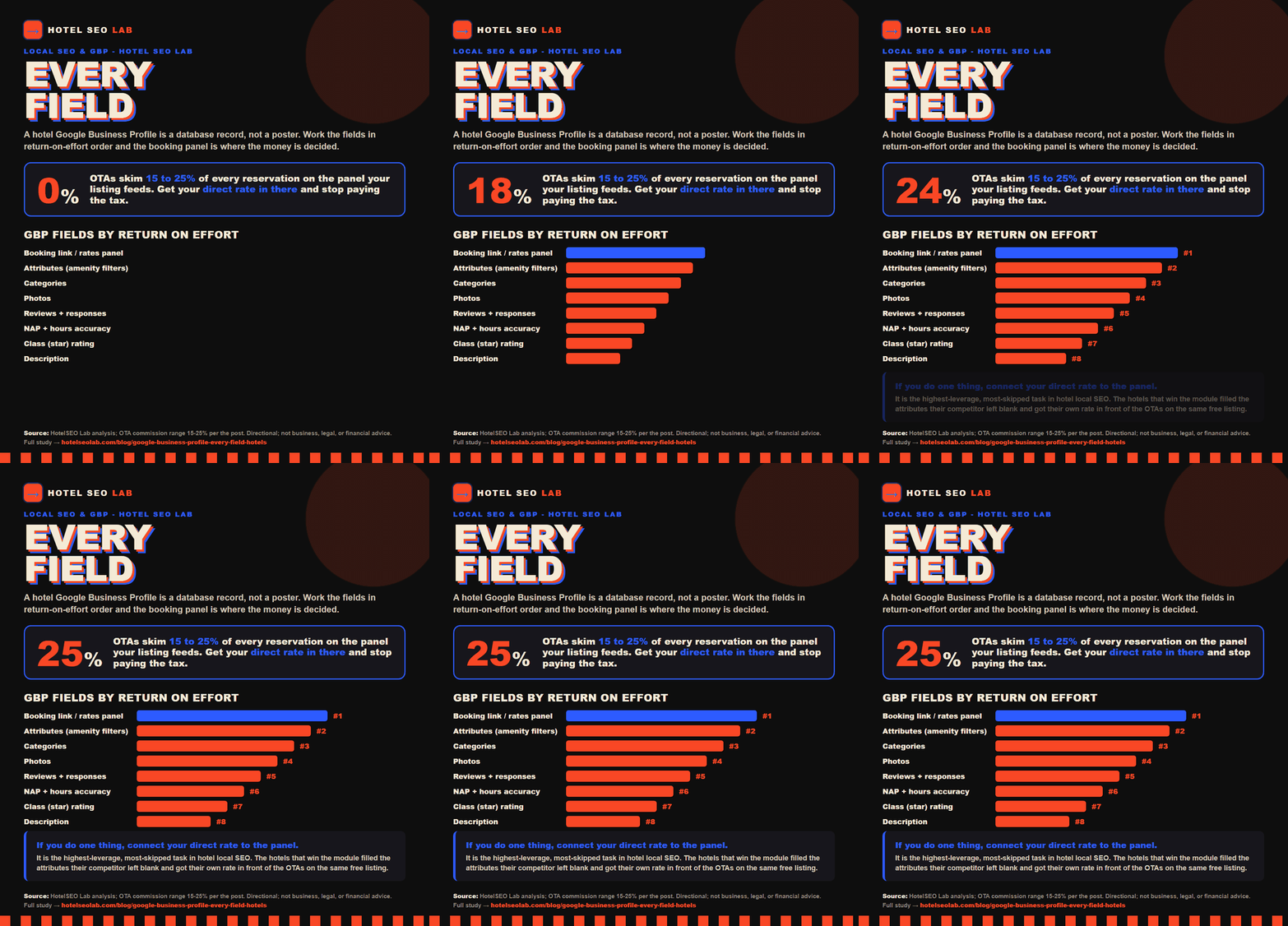
Here is the field that separates hotels who understand GBP from hotels who decorate it. On a lodging profile, the prominent “check availability” / rates panel is populated through Google’s Hotel Ads and free booking links program. By default, that panel is a wall of OTAs — Booking.com, Expedia, Hotels.com — each taking 15 to 25 percent of a reservation you could have taken commission-free.
You can get your own direct rate into that panel. If your booking engine supports Google free booking links (many do — SiteMinder, Cloudbeds, Little Hotelier, Profitroom, and others), connecting it makes your official-site rate appear alongside the OTAs, frequently at the top and flagged as the official site. This is the highest-leverage, most-skipped task in hotel local SEO. It is the difference between Google sending a ready-to-book traveler to Expedia versus to your own booking engine, on the same free listing.
If you take one action from this entire post, make it this one. We go deeper on the mechanics and the OTA dynamics in how OTAs steal your search traffic and in our book-direct CRO service, but the short version: get your direct rate into that panel, then make sure your rate parity and your own site do not make the OTA look cheaper once the click lands.
8. Reviews and responses — a ranking factor you shape with a workflow
Reviews influence both ranking and conversion, and they are the field you can most reliably improve with a simple operational habit. Volume, average rating, freshness, and — underrated — your responses all feed the picture Google and travelers build.
- Ask, systematically. Bake a review request into checkout and the post-stay email. The polite ask at the front desk from a guest who just thanked you converts better than any automated nudge alone. Never buy or incentivize reviews; it violates guidelines and the fake ones are increasingly easy to spot.
- Respond to all of them — good and bad. Thank the positive ones briefly and specifically. Answer the negative ones calmly, factually, and without defensiveness; that reply is read by every future guest deciding whether one bad night was a fluke or a pattern.
- Watch velocity, not just total. A steady trickle of recent reviews signals a live, cared-for property. Twenty reviews from three years ago signal neglect.
Reviews are also increasingly the raw material AI assistants quote when a traveler asks for a recommendation, which ties directly into whether your hotel is visible to ChatGPT and other AI search and to our content and reputation work.
9. Q&A, Posts, and Products — use them if your profile has them
Depending on your profile type and region, some of these appear and some do not.
- Questions and answers: if the module is live, seed it. Post the real questions your front desk hears — parking, airport distance, check-in time, pet policy — and answer them from the owner account. You control the first, most-visible answers instead of letting a random guest guess. Monitor for new questions; an unanswered “is there parking?” sitting for weeks is a lost booking.
- Posts: many lodging profiles have limited or no Posts. If you have them, use them for genuine, time-relevant updates (a seasonal package, an event, a renovation reveal) — not keyword filler. If you do not have them, do not chase it.
- Products / rooms: where a room or highlights carousel is offered, populate it with real room types, honest starting rates, and good photos. It is another surface pulling a traveler toward booking.
Treat these as bonus surfaces. The core wins are categories, attributes, photos, the booking link, and reviews. Do those before you fuss over a Post.
10. NAP consistency and the basics that quietly break rankings
None of the above matters if the foundational fields are inconsistent. Google cross-checks your Name, Address, Phone against your website and the wider web to trust you are a real, single, consistent business.
- Address and map pin: exact, and the pin dropped on the actual entrance. A pin in the wrong block sends guests — and delivery of trust signals — astray.
- Phone: a consistent primary number that matches your site and citations.
- Website: point it at your booking-optimized homepage or a dedicated landing page, not a buried PDF. This link carries weight; make it count.
- Hours: for hotels, set 24-hour or your real reception hours accurately, and use special hours for holidays. Wrong hours generate the “called and no one answered” review.
Consistency across your site, GBP, and OTA listings is exactly the kind of structured, machine-readable signal that also helps you show up in AI answers and rich results — the same discipline behind our work on OTA destination landers that rank and AI visibility.
A field-by-field priority order
If you are staring at the dashboard wondering where to start, work in this order of return-on-effort:
| Priority | Field | Why it’s here |
|---|---|---|
| 1 | Booking link / rates panel | Directly decides direct vs OTA booking |
| 2 | Attributes | Determines if you appear in filtered searches |
| 3 | Categories | Core relevance signal for what you rank for |
| 4 | Photos | Decides who taps you vs scrolls past |
| 5 | Reviews + responses | Ranking and conversion; compounding |
| 6 | NAP + hours accuracy | Foundation; breaks everything if wrong |
| 7 | Class rating | Filter eligibility, expectation-setting |
| 8 | Description | Converts, does not rank; do it well, move on |
| 9 | Q&A / Posts / Products | Bonus surfaces where available |
The mindset that makes this work
A hotel Google Business Profile is not a marketing brochure you set once. It is a living database record that Google reads to answer a traveler’s question and that a traveler reads to make a fast decision. Every field is either giving Google a reason to rank you and a traveler a reason to book you — or it is empty, wrong, or stale, doing the opposite.
The independent hotels that win the local pack and the hotel module are not the ones with the biggest ad budget. They are the ones who filled in the attributes their competitor left blank, connected their direct rate to the booking panel while the hotel down the road left it all to the OTAs, and kept the photos and reviews fresh instead of going quiet. Those are field-level decisions. You control every one of them.
If you would rather have this audited and set up properly than grind through it yourself, that is exactly what our local SEO and GBP service and broader hotel SEO work exist to do. Want a second set of eyes on your profile before you touch anything? Book a call and we will walk your listing field by field together.