
Your hotel’s website has a speed score, whether you look at it or not. Google measures it on every mobile visit, folds it into how your pages get ranked, and never sends you the report. Meanwhile your marketing manager is being told to “improve Core Web Vitals” by an agency, a consultant, or a dashboard that turned three metrics into a scary red circle.
Here is the honest version: Core Web Vitals are not as complicated as the acronyms make them sound, and the fixes with the most leverage for hotels almost never require a developer. They require someone who understands that a 4MB lobby photo, a booking widget that loads on every page, and four analytics scripts you forgot you installed are quietly costing you direct bookings.
This is the non-developer’s fix-it guide. We will decode the three metrics in plain English, measure them in five minutes, and then work through the changes you can actually make yourself, ranked by how much they move.
What Core Web Vitals actually are
Google’s Core Web Vitals are three numbers meant to answer three human questions a guest asks without realizing it.
LCP — Largest Contentful Paint. “How long until the main thing on this page shows up?” On a hotel page, the largest thing is almost always your hero image: the sunset over the pool, the suite, the rooftop bar. LCP is the seconds it takes for that image to finish painting. Good is under 2.5 seconds. Most independent hotel sites we audit sit between 3.5 and 6 seconds on mobile, and the culprit is nearly always one enormous unoptimized photo.
INP — Interaction to Next Paint. “When I tap something, how fast does the page respond?” A guest taps “Check availability” or opens the date picker, and INP measures the lag before anything visibly happens. Good is under 200 milliseconds. This one is usually poisoned by heavy JavaScript, and for hotels that means the booking engine and a pile of third-party scripts fighting for the phone’s processor.
CLS — Cumulative Layout Shift. “Does the page jump around while I’m reading it?” You go to tap the room rate, an ad or a late-loading banner shoves the content down, and you tap the wrong thing. CLS scores that instability from 0 to 1. Good is under 0.1. Hotels get burned by cookie banners, review widgets, and booking bars that load late and push everything sideways.
The one-sentence version: LCP is “did it show up fast,” INP is “did it react fast,” CLS is “did it stay still.” Guests feel all three even when they cannot name them, and a frustrated guest on a slow mobile page is a guest who taps back to the OTA listing instead.
Download this study as a one-page PDF
That last point is the business case. Core Web Vitals are a ranking signal, but the bigger cost is behavioral. A slow, jumpy site leaks the exact high-intent traffic you fought to win, and it hands them straight back to the channels that charge you commission. If you want the full picture of how that traffic gets siphoned, we broke it down in how OTAs steal search.
Measure before you touch anything
Do not fix what you have not measured. Two free tools give you everything you need.
PageSpeed Insights (pagespeed.web.dev) is the one to start with. Paste your homepage URL, then paste your single most important room or booking page. Look at the mobile tab, not desktop, because mobile is where hotel discovery happens and where the scores are worst. Two things matter on that report:
- The field data at the top (“Discover what your real users are experiencing”). This is Google’s record of actual visitors over the last 28 days, and it is the data that influences ranking. If you see it, trust it over everything else.
- The lab data below, which is a single simulated load. Useful for diagnosis, but it is one lab run on one connection, so do not panic at a single bad number.
Google Search Console has a Core Web Vitals report under the Experience section that groups your URLs into Good, Needs Improvement, and Poor, at scale, across your whole site. This is where you find out that it is not just your homepage but every one of your forty room pages sharing the same bloated template.
Write down three starting numbers for your two key pages: LCP in seconds, INP in milliseconds, CLS as a decimal. That is your baseline. Now let us move them.
Fix 1: Your images (the single biggest LCP win)
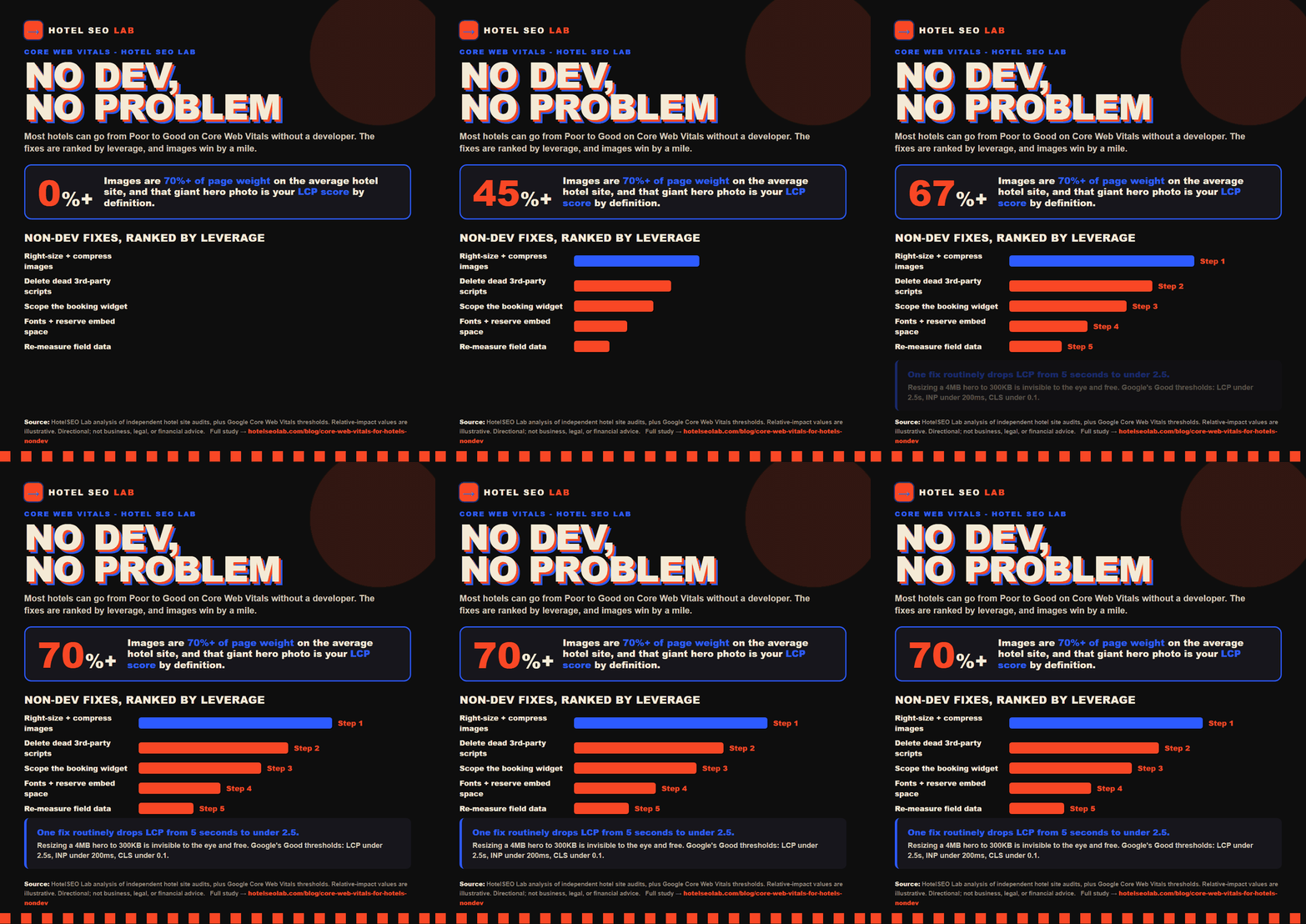
If you do only one thing, do this. For the overwhelming majority of hotel sites, images are 70 percent or more of the page weight, and the hero image is the LCP element by definition. Fixing images is the highest-leverage, lowest-skill change available to you.
Right-size the file. That gorgeous 5000-pixel-wide hero straight from the photographer does not need to be delivered at 5000 pixels to a phone that is 400 pixels wide. Resize your largest display images to roughly 2000 pixels wide maximum before uploading. A photo dropping from 4MB to 300KB is routine and invisible to the eye.
Use a modern format. Serve images as WebP or AVIF instead of JPEG or PNG. Same visual quality, often 30 to 50 percent smaller. Most modern CMS platforms and image plugins can convert automatically; you just have to switch the setting on.
Compress everything else. Run your gallery and room photos through a compressor (TinyPNG, Squoosh, or your platform’s built-in optimizer) before they ever go live. Make it a rule that no image gets uploaded raw.
Lazy-load below the fold, but never the hero. Images further down the page should load only as the guest scrolls to them. But do not lazy-load your hero image, because that delays the exact thing LCP is timing. Most platforms lazy-load everything by default, which ironically hurts the hero. Make sure your main hero is set to load eagerly.
This one category of fix routinely takes a hotel from a 5-second LCP to under 2.5. No developer required, just discipline about what you upload. The same discipline pays off on your Google Business Profile photos, where oversized images slow the mobile experience Google is increasingly judging you on.
Fix 2: Tame the booking widget (your INP problem)
The booking engine is the beating heart of your direct-booking strategy and, more often than not, the heaviest thing on the page. Hosted widgets from the major booking-engine vendors load large JavaScript bundles, and when that script runs on page load it clogs the phone’s processor, which is exactly what tanks INP and delays interactivity.
You almost never control the widget’s internal code. But you control three things around it, and all three are non-developer decisions.
Only load it where guests book. There is rarely a reason to embed the full availability engine on your homepage, your blog posts, or your local-area guide pages. Load it on the booking page and the room pages. Every other page gets a simple, lightweight “Check availability” button that links through. This alone can transform sitewide INP.
Defer the script. Ask whether your booking engine offers an asynchronous or deferred loading option, or whether your CMS lets you load its embed script with a defer attribute. Deferring means the page becomes readable and interactive first, and the booking engine finishes loading a moment later, instead of blocking everything up front.
Do not auto-open the calendar. Widgets that pop open a full date-picker calendar on page load are doing the most expensive possible work at the worst possible moment. Configure it to open on tap instead.
If your vendor cannot support any of this, that is real information. A booking engine that forces a slow, sitewide script with no deferral option is costing you conversions in two directions at once, and it belongs on the list of things you raise at renewal. We get deeper into squeezing more direct revenue out of the booking path in our book-direct CRO guide, and the raw math on why every recovered direct booking matters is laid out in the book-direct math on OTA commission.
Fix 3: Stop your fonts from blocking the page
Custom fonts make your brand look like your brand, and they also delay text from appearing if handled carelessly. Two non-developer fixes cover most of the damage.
Set font-display to swap. This tells the browser to show your text immediately in a fallback font, then swap in the branded font once it loads, instead of leaving guests staring at blank space. Many theme and font settings expose this as a simple toggle. Google Fonts includes it when you use the standard embed.
Cut the number of font files. Every weight and style is a separate download. If your site loads Light, Regular, Medium, Semibold, Bold, and every italic on top, you are downloading a dozen files most pages never use. Pick two or three weights you actually need and drop the rest. Fewer fonts, faster text, and honestly a tidier design.
Fonts rarely move your score as dramatically as images, but they are quick, and quick wins add up across a template used on hundreds of pages.
Fix 4: Audit your third-party scripts
Here is where hotels accumulate silent debt. Over the years you add a chat widget, a reviews badge, a Facebook pixel, two analytics tools, a heatmap tracker, a currency converter, an abandoned-cart tool, a cookie banner. Each one loads its own JavaScript, and collectively they are a major drag on INP and a frequent cause of layout shift.
Open your site and honestly list every third-party tool loading on it. For each one, ask a blunt question: is this earning its place? The heatmap tool you installed for one project two years ago and never opened again is pure cost. Remove it.
For the tools you keep, two rules:
Load them late. Chat widgets, review badges, and marketing pixels almost never need to load before the page is usable. Most tag managers and CMS platforms let you defer or delay these until after the page is interactive.
Reserve their space to kill layout shift. This is the big CLS fix. When a review widget or a promotional banner loads late and has no space reserved for it, it shoves your content down and spikes CLS. The fix is to give the container a fixed height so the space is held from the start and nothing jumps when the widget arrives. Your web person can do this in minutes; even many page builders expose a min-height setting on a block.
Cookie consent banners deserve special mention because they are a top CLS offender for hotels in regulated markets. If your banner pushes the whole page down when it appears, have it overlay the content or anchor to the bottom instead of inserting itself into the layout flow.
The realistic order of operations
You do not do all of this at once. Work the leverage:
- Images first. Biggest LCP win, lowest skill required. Do this week one.
- Third-party script cleanup second. Deleting dead tools is free and helps INP and CLS together.
- Booking widget scoping third. Restrict it to the pages that need it and defer the script.
- Fonts and reserved-space fixes fourth. Fast polish that locks in the gains.
- Re-measure. Return to PageSpeed Insights and Search Console. Field data updates over about 28 days, so give it a few weeks before you judge the real-world result.
A grounded expectation: most independent hotels can move from “Poor” or “Needs Improvement” to “Good” on the majority of these metrics using only the non-developer fixes above. If you have done all of it and still fail, you now have a precise, evidence-backed brief for a developer, which is the cheapest possible way to buy engineering time.
Where speed sits in the bigger picture
Core Web Vitals are a foundation, not a strategy. A blazing-fast page with thin content and no authority still loses to a slower page that genuinely answers what a traveler is searching for. Speed is the tiebreaker that decides close races, and in competitive hotel search a lot of races are close.
So treat this as table stakes. Get your site fast and stable, then put your real energy into the work that wins the ranking in the first place: the content, the local signals, and increasingly, whether AI assistants can even find and recommend you. If a chatbot is now part of how your guests plan trips, it is worth checking whether your hotel is visible to ChatGPT at all, and understanding how AI visibility, AEO, and GEO are reshaping discovery. Fast, findable, and recommended is the full stack. Speed is where it starts.
If you want a second set of eyes on your site’s speed, your booking path, and where you are quietly losing direct bookings to the OTAs, book a call with us. We will tell you the truth about what is worth fixing and what is not, no guaranteed-number-one nonsense.